Integrating a CRM system with your website is the foundation for a successful online store. It not only automates order processing but also improves customer service, making it faster and more efficient.
In e-commerce, it’s crucial that everything runs smoothly: from how quickly orders arrive to how easily customers can get support. Without CRM synchronization, everything becomes a mess.
When a CRM is integrated with a website, data is updated automatically, and all processes run smoothly—from order placement to delivery. This saves time, minimizes errors, and gives customers the feeling of being handled by professionals.
Why is CRM integration with a website necessary?
Firstly, it helps automate request processing . When the CRM syncs with the website, customer and order data is updated automatically, eliminating the need to manually enter information or worry about forgetting something.
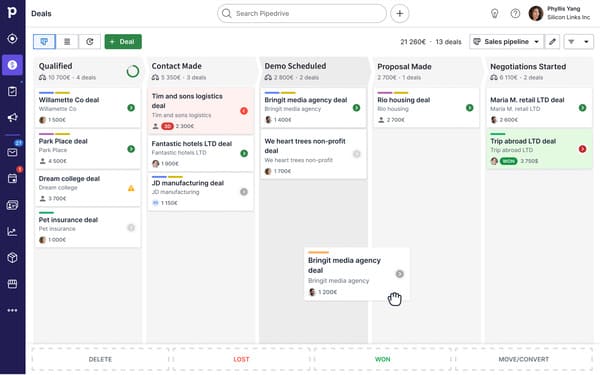
Pipedrive CRM integration:
Secondly, integration enables personalized customer interactions . CRM collects data on customer behavior and preferences, allowing it to offer exactly what they need at the right time. This personalized approach increases loyalty and encourages repeat purchases.
Furthermore, the integration helps optimize business processes within the company. All data on orders, customers, and products is synchronized in real time, significantly simplifying collaboration between departments. Marketing, sales, and the warehouse all work with up-to-date information.
Ultimately, this integration not only makes life easier for your team but also improves the customer experience, which directly impacts conversion.
CRM integration with a website for different types of platforms
When discussing CRM integration with a website, it’s important to consider the platform type your online store runs on. Depending on this, the integration approach can vary—from simple starter solutions to complex custom developments that require high flexibility.
The type of website you choose directly impacts the CRM integration solutions available.
For landing pages and simple websites (using builders or ready-made templates), CRM integration is limited, but still possible through third-party services or basic connections. These websites are well-suited for starting out if minimal automation and simplified data management are required.
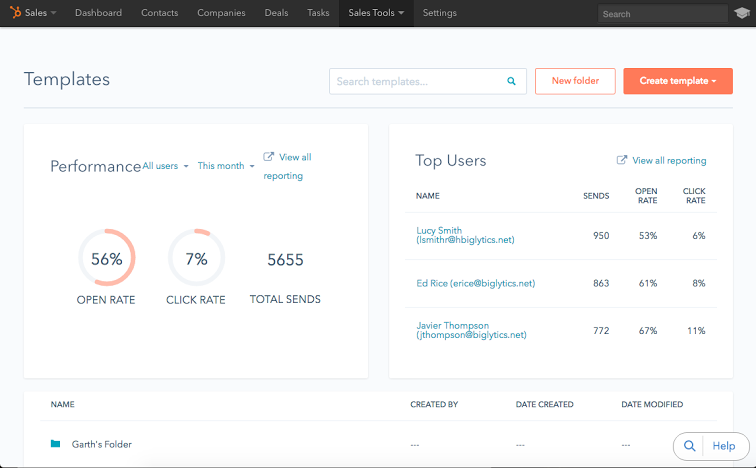
CRM from HubSpot:
Online stores and corporate websites require more complex CRM integrations, especially if you handle large volumes of data, products, and orders. More solutions are available for full synchronization with the CRM system and other services, such as warehouses or marketplaces. Integration is possible with both template platforms and custom solutions, but custom development offers greater flexibility for customization to meet unique business needs.
Regardless of which type of website you choose, CRM integration is customizable, but with varying degrees of complexity depending on the platform.
Read: How to choose between a template, a builder, and custom website development
Steps to Successfully Integrate CRM with Your Website
To ensure successful CRM integration with your website, it’s important to properly organize several key steps. Without these steps, the entire process can be delayed and require unnecessary effort.
The first step is to analyze business processes and prepare technical specifications. It’s important to understand what data needs to be transferred between the website and the CRM, what functions need to be automated, and what external systems will be connected. At this stage, it’s important to consider both current and future business needs to ensure the integration can scale as the business grows.
The next step is setting up APIs and integrations . This is the most technical part of the process, requiring data exchange between websites, CRM systems, the warehouse, and payment services. At this stage, it’s important to ensure proper configuration of real-time data transfer to avoid data loss or duplication.
After configuring integrations, testing is an important step . Testing all processes, from user registration to order placement, allows you to identify issues early and avoid errors after launch. It’s important to test across various scenarios to ensure the CRM system functions correctly under any workload.
Finally, the final stage is staff training . Once the system is integrated and tested, employees need to be trained on the new functionality: how to use CRM data for sales, how to track orders, and how to handle customer inquiries. It’s also important to ensure system support throughout all stages of its operation.
The Impact of CRM Integration on Business Processes
Integrating your CRM with your website has a significant impact on many aspects of your business. It’s not just a convenient way to store data, but a true tool that helps improve customer service and increase overall efficiency.
One of the main benefits of integration is increased conversion rates in the online store . CRM helps personalize customer engagement by analyzing their behavior, preferences, and purchase history. This allows you to offer products or services that are most relevant to each customer, increasing their likelihood of purchase. Furthermore, by automating processes such as sending offers and abandoned cart reminders, CRM helps maintain consistent customer engagement, which contributes to retention.
Integrating your CRM with your website also helps improve order processing. All customer information, including their orders and processing status, is synchronized in real time, allowing for faster responses to inquiries and reduced delivery times. This significantly improves service levels and customer satisfaction, helping to retain customers in your online store.
Furthermore, the integration facilitates business process management within the company. All departments work with up-to-date information on orders, customers, and products, facilitating coordination. The warehouse can automatically update product availability, and the sales department receives notifications about new orders. This eliminates data duplication and minimizes the likelihood of errors.
Conclusion
Integrating a CRM with a website is a strategic step for businesses looking to improve their efficiency and customer service. Whether you choose a template, a website builder, or custom development, a properly configured CRM system will help automate processes, increase conversions, and improve customer engagement. The integration process requires a careful approach, from business process analysis to staff training. It’s important to understand that each platform has its own unique characteristics, and the choice of solution should depend on your current needs and the scale of your business.
Read about why you shouldn’t start a project with a long-term plan and start with an MVP instead, in Nineseven CEO Dmitry Khoruzhko’s Telegram channel.
If your business is just starting out and you’re not yet sure of the scale of your future needs, you can start with simple solutions and gradually develop the system as you grow.